How to change the new tab page in Chrome
November 2026 · 4 min read
Short answer: open a new tab and click Customize Chrome at the bottom right to change its background, colours and shortcuts. Chrome has no setting for putting a page of your own there; for that you need an extension that replaces the new tab page, such as TabCabin.
1. Customize Chrome's own new tab page
The page with the Google search box can change its look, not what it holds.
- Open a new tab and click Customize Chrome at the bottom right. A side panel opens.
- Change the theme: pick a background from the gallery or upload a picture of your own. Chrome suggests colours to match it.
- Under Shortcuts, turn them off, or choose between the sites you visit most and shortcuts you add yourself.
Good for a calmer page in a minute. It is still the same search box and a row of shortcuts, with no room for notes or anything longer.
2. Open your own page with the Home button or at startup
Two settings come close, although neither changes a new tab.
- In Settings → Appearance, turn on Show Home button and enter a web address. The Home button next to the address bar now opens that page.
- In Settings → On startup, choose Open a specific page or set of pages, and Chrome opens them every time it starts.
Good when one website is where you start the day. New tabs still open Chrome's own page, because Chrome has no setting for a new tab address.
3. Replace the new tab page with an extension
Extensions are the only way to put something else in every new tab: a dashboard, a quote, a to-do list or your saved tabs. A few things are worth knowing first.
- Only one extension at a time can own the new tab page.
- The first time a new tab opens, Chrome may ask whether this is the page you expected. Keep it to stay with the extension.
- To go back, open the ⋮ menu → Extensions → Manage Extensions and turn the extension off or remove it.
4. Boards in every new tab with TabCabin
TabCabin is a free, open-source extension that turns the new tab page into boards of tabs, links, notes and to-dos. Instead of a search box, every new tab shows the things you are working on.
- Get TabCabin for Chrome, Edge or Brave and open a new tab.
- Pick how to start: a starter board with a few tips, an empty board, or one of the ready-made templates.
- Drag open tabs from the panel on the left into groups, and add notes or to-dos next to them.
- In Settings → Appearance, choose a light or dark theme and a compact density if you want more on the screen. Under Settings → Data, Most visited sites → Add puts the sites Chrome's shortcuts used to show into a group.
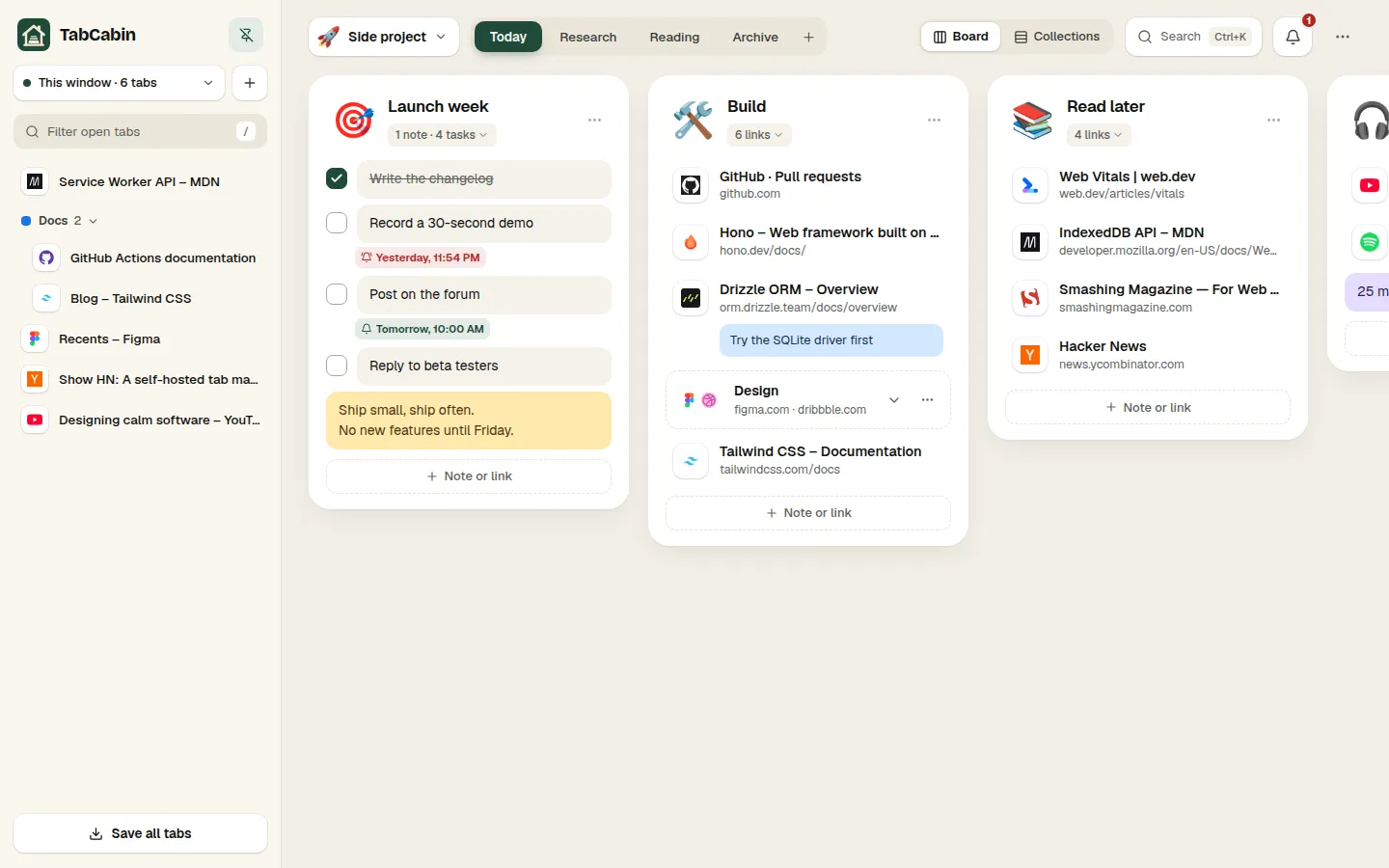
Your boards stay in the browser and work offline. Sign in when you want the same boards on your other computers.
Which one to pick
Customize Chrome
- A new tab shows
- Google search and shortcuts
- Your own links
- A row of shortcuts
- Notes and to-dos
- No
Home button or startup page
- A new tab shows
- Still Chrome’s page
- Your own links
- One page you choose
- Notes and to-dos
- No
TabCabin
- A new tab shows
- Your boards
- Your own links
- Groups of links, as many as you like
- Notes and to-dos
- Yes
Questions
Can I set a website as the new tab page without an extension?
No. Chrome has no setting for a new tab address. The Home button and the startup pages are the closest it gets.
Do I lose Google search on a new tab?
The address bar still searches with your search engine, as it does on any page. In TabCabin,Ctrl+K searches your boards, open tabs and bookmarks.
How do I get Chrome's own page back?
Turn the extension off in Manage Extensions, or remove it. With TabCabin, sign in or export a backup from Settings → Data first, so your boards are kept.